
More fun with UnetLab today!
I am back to running it on the ESXi server, so have plenty of memory and CPU cores. It should be nice and fast!
vIOS on UnetLab

Following the documentation through (or so I thought), I then created a lab, added a network, and tried to add a vIOS node.
But the list was empty.
So, I read through the doc again, and some of the comments. Andrea tells us what the image name should be, so I created a folder to match the version, and moved the HDA file into there:

Now we are good!

Topology
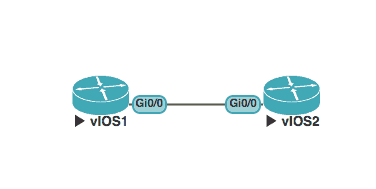
The topology looks like this: 
So let’s try configuring the routers!
Router(config)#ho vIOS-1
vIOS-1(config)#int gi 0/0
vIOS-1(config-if)#ip add 10.1.1.1 255.255.255.0
vIOS-1(config-if)#no shut
vIOS-1(config-if)#cdp enable
vIOS-1(config-if)#exit
vIOS-1(config)#cdp run
vIOS-1(config)#exit
vIOS-1#sh ip int bri
Interface              IP-Address      OK? Method Status                Protocol
GigabitEthernet0/0     10.1.1.1        YES manual up                    up
GigabitEthernet0/1     unassigned      YES unset  administratively down down
GigabitEthernet0/2     unassigned      YES unset  administratively down down
GigabitEthernet0/3     unassigned      YES unset  administratively down down
vIOS-1#

Router(config)#ho vIOS-2
vIOS-2(config)#int gi 0/0
vIOS-2(config-if)#ip add 10.1.1.2 255.255.255.0
vIOS-2(config-if)#no shut
vIOS-2(config-if)#cdp en
vIOS-2(config-if)#exit
vIOS-2(config)#cdp run
vIOS-2(config)#exit
vIOS-2#s
Interface              IP-Address      OK? Method Status                Protocol
GigabitEthernet0/0     10.1.1.2        YES manual up                    up
GigabitEthernet0/1     unassigned      YES unset  administratively down down
GigabitEthernet0/2     unassigned      YES unset  administratively down down
GigabitEthernet0/3     unassigned      YES unset  administratively down down
vIOS-2#sh cdp neigh
Capability Codes: R - Router, T - Trans Bridge, B - Source Route Bridge
                  S - Switch, H - Host, I - IGMP, r - Repeater, P - Phone,
                  D - Remote, C - CVTA, M - Two-port Mac Relay

Device ID        Local Intrfce     Holdtme    Capability  Platform  Port ID
vIOS-1           Gig 0/0           150              R B   IOSv      Gig 0/0

Total cdp entries displayed : 1
vIOS-2#ping 10.1.1.1
Type escape sequence to abort.
Sending 5, 100-byte ICMP Echos to 10.1.1.1, timeout is 2 seconds:
.!!!!
Success rate is 80 percent (4/5), round-trip min/avg/max = 1/5/12 ms
vIOS-2#
Easy.
I took the first screenshot at 13:22, it’s now 13:58, and I have written this whilst setting it all up. 30 minutes or less!
ASA on UNetLab
Not sure how this will go. There isn’t a guide for it, so It’s going to be a lot of guess work!
I start by copying the two VMDK files I have to the /tmp directory:
root@iou:/# ls /tmp
ASA-8.42-1.vmdk  ASA-8.42.vmdk
root@iou:/#
Then I convert them:
root@iou:/tmp# qemu-img convert -f vmdk -O qcow2 ASA-8.42.vmdk hda.qcow2
root@iou:/tmp# qemu-img convert -f vmdk -O qcow2 ASA-8.42-1.vmdk hdb.qcow2
root@iou:/tmp#
I then move to the right directory, and move the files there:
root@iou:/opt/unetlab/addons/qemu# mkdir ASA-8.42
root@iou:/opt/unetlab/addons/qemu# mv /tmp/hda.qcow2 ASA-8.42/
root@iou:/opt/unetlab/addons/qemu# mv /tmp/hdb.qcow2 ASA-8.42/
root@iou:/opt/unetlab/addons/qemu# /opt/unetlab/wrappers/unl_wrapper -a fixpermissions
root@iou:/opt/unetlab/addons/qemu#
Surprisingly… There is nothing there when I try and add a node:

At this point I started reading some of the other documents. I went through all of them until I got to the F5 BIG-IP document. Here we have another example of a 2 part system. I was happy that I had named the files hda and hdb, but then I thought – let’s just try making the folder name lower case. So I edited it in FileZilla:
root@iou:~# ls /opt/unetlab/addons/qemu/
asa-8.42  vios-adventerprisek9-m15.4-1.2.0-173  xrv-k9-5.2.2
root@iou:~#
All of a sudden, I have the option for ASAs!

So. let’s create a new lab and connect everything up!


ciscoasa(config)# hostname ASA1
ASA1(config)# int gi 0
ASA1(config-if)# ip add 10.1.1.1 255.255.255.0
ASA1(config-if)# nameif Outside
INFO: Security level for "Outside" set to 0 by default.
ASA1(config-if)#
ASA1(config-if)# no shut
ASA1(config-if)#

ciscoasa(config)# hostname ASA2
ASA2(config)# int gi 0
ASA2(config-if)# ip add 10.1.1.2 255.255.255.0
ASA2(config-if)# no shut
ASA2(config-if)# nameif Outside
INFO: Security level for "Outside" set to 0 by default.
ASA2(config-if)#

ASA1# ping 10.1.1.2
Type escape sequence to abort.
Sending 5, 100-byte ICMP Echos to 10.1.1.2, timeout is 2 seconds:
!!!!!
Success rate is 100 percent (5/5), round-trip min/avg/max = 1/2/10 ms
ASA1#

ASA2# ping 10.1.1.1
Type escape sequence to abort.
Sending 5, 100-byte ICMP Echos to 10.1.1.1, timeout is 2 seconds:
!!!!!
Success rate is 100 percent (5/5), round-trip min/avg/max = 1/2/10 ms
ASA2#
Wow!
So, in two days, with a total of about three hours, I now have one environment that will run IOL routers, XRv routers, vIOS routers and ASAs.
Now that is impressive!
I might even try and add Titanium to UNetLab as well! But not today.